Creative Agency Single Page
Demo site URL: Creative-Single-Page
This is my solution to a Frontend Mentor Challenge. Frontend Mentor challenges help you improve your coding skills by building realistic projects.
Built with
Semantic HTML5 markup
CSS custom properties
Flexbox
CSS Grid
Mobile-first workflow
Screenshot (Desktop)

Screenshot (Tablet)
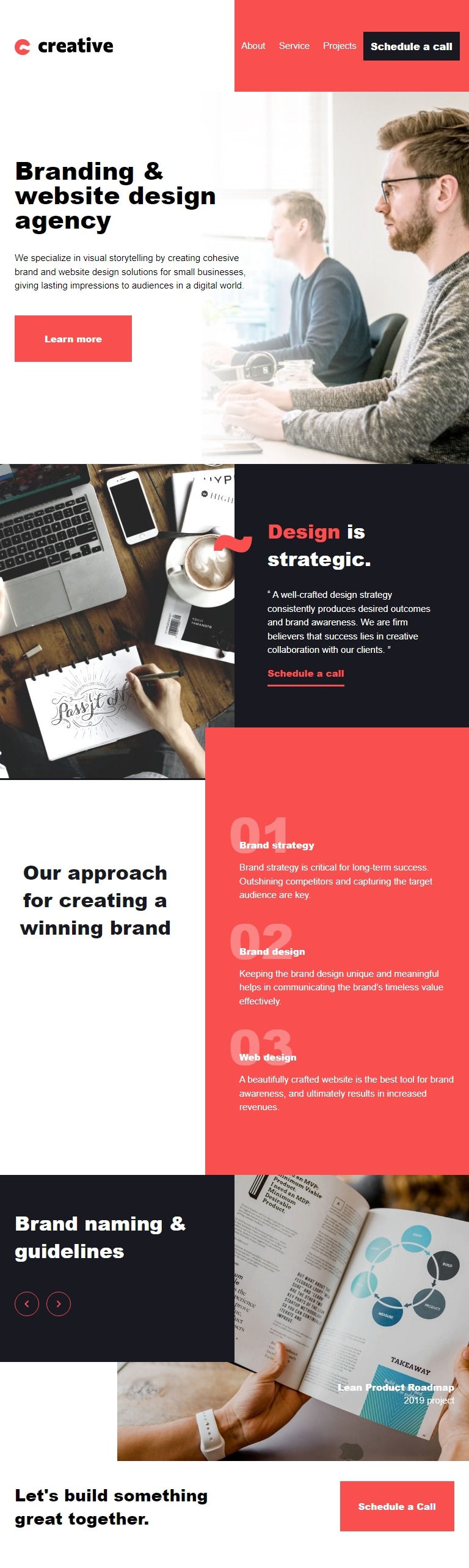
Screenshot (Mobile)

The challenge
Users should be able to:
View the optimal layout for the site depending on their device’s screen size
See hover states for all interactive elements on the page
Navigate the slider using either their mouse/trackpad or keyboard
What I learned
This challenge came together from a mobile-first and semantic HTML driven design. One of the best things I learned about this project is attention to detail. I’ve configured the site well to suit the design needs. With more time dedicated to CSS practices, I can refine the design to exact perfection. For now, the design is well and looks good on devices of all sizes. I worked with the design and filled in missing details like any developer may, where decisions had to be made. I enjoyed the assets’ consistency in this project. It challenged my markup skills to have all the pictures be at the right sizes in responsive design.
An example challenge picture
<picture>
  <source srcset="assets/mobile/image-slide-1.jpg" media="(max-width: 375px)" width="375" height="404" />
  <source srcset="assets/tablet/image-slide-1.jpg" media="(max-width: 438px)" width="438" height="472" />
  <source srcset="assets/desktop/image-slide-1.jpg" media="(min-width: 439px)" width="895" height="728" />
  <img src="assets/mobile/image-slide-1.jpg" alt="Brand section photo: A design pamphlet being read." />
</picture>
main @media screen and (min-width: 501px) {
  & img {
    object-fit: contain;
    object-position: top;
    height: auto;
  }
}
A JS function I’m proud of
main: () => {
  const navigation = new NavigationAction();
  navigation.init();

  const slideshow = new BrandSpotSlideShow();
  slideshow.init();
};
Try it yourself
This is a static website repository. Because there’s no webserver configuration in the project files, it can be used anywhere! Try Brackets IDE with these instructions:
Open Brackets web IDE: https://phcode.dev/
Click add a GitHub project
Enter the url: https://github.com/robhowe-A/Creative-Single-Page.git
Click ‘index.html’ in the docs folder for brackets to show the code editor/web server
In Brackets, ensure the live preview is enabled (it starts by default the first attempt)
Brackets is special with markup styling. It highlights the selected element in the view page while you’re writing the HTML or CSS.
Author: Robert Howell
LinkedIn - Robert Howell
GitHub - Robert Howell