Password generator
Users should be able to:
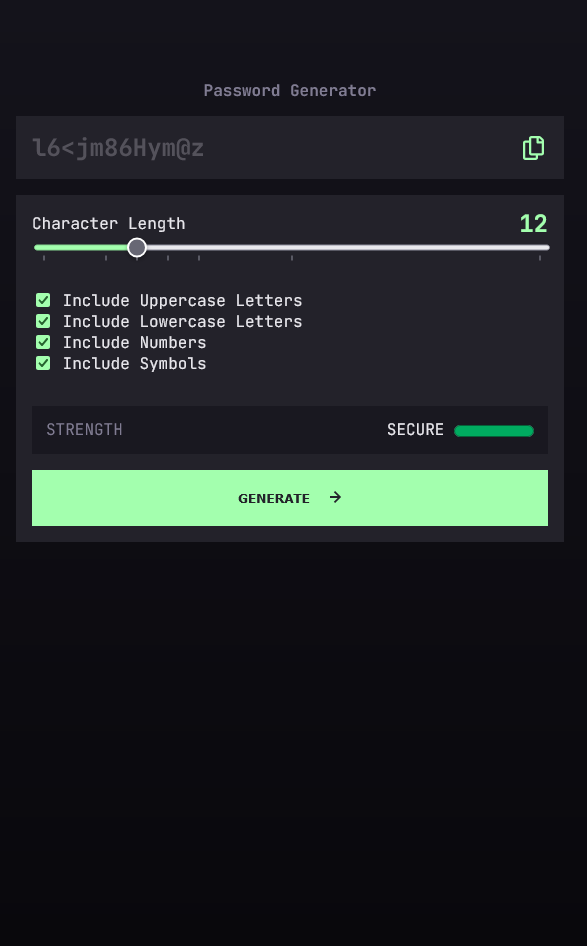
Generate a password based on the selected inclusion options
Copy the generated password to the computer’s clipboard
See a strength rating for their generated password
Demo URL: https://securepasswordgeneratordemo.netlify.app/
What I learned
Password complexity strength can be scored to measure relative to the available input selections. In effect, more character choices in a password result in a higher complexity score. The length of the generated password compounds multiplies the security effectiveness, too, for better security.
A chosen password without complex characters requires higher character count to meet the complexity of a shorter complex character password.
This system functions in the example and is noted as below, to illustrate.
Complexity scoring meter
<meter id="password-strength-meter" min="0" low="380" high="665" optimum="1140" max="1140" value="0">at 25/100</meter>
Complexity scoring function
const calculateComplexityScore = () => {
    complexityScore = 0;

// The complexity score is calculated based on the combination of selected character types. Each
// character type adds a different number of points to the score based on the number of characters
// in the selected set. I.E. [A-Za-z]: 52, [0-9a-z]: 36;

    if (includeUppercaseInput.checked) {
        complexityScore += 26;
    }
    if (includeLowercaseInput.checked) {
        complexityScore += 26;
    }
    if (includeNumbersInput.checked) {
        complexityScore += 10;
    }
    if (includeSymbolsInput.checked) {
        complexityScore += 33;
    }

// Multiply the length of the password to determine the overall strength
    let strengthValue = complexityScore * characterLength

// Set meter value and span text
    strengthValueMeter.value = strengthValue
    setMeterStrengthSpanText(strengthValue);
}
* Each character type adds a different number of points to the complexity score based on the number of characters in the selected set.
* The complexity score is multiplied by the length of the password to determine the overall strength.
Screenshot
Continued development
Compliance documents recommend complex passwords with at least 12 characters. Continued development recommends including unicode characters into new passwords, such as emojis and character symbols.
Built for the web
Semantic HTML5 markup
CSS: Grid, Flexbox, styled components
JavaScript
Useful resources
Harvard CS50’s Intro to Cybersecurity – Full University Course - YouTube - This article helped me to complete the complexity scoring based on the discussion of password cryptanalysis.
<input type=”range”> - This article details important use cases and attributes.
This is a solution to the Password generator app challenge on Frontend Mentor. Frontend Mentor challenges help you improve your coding skills by building realistic projects.